> For the complete documentation index, see [llms.txt](https://docs.linuxfoundation.org/lfx/llms.txt). Markdown versions of documentation pages are available by appending `.md` to page URLs; this page is available as [Markdown](https://docs.linuxfoundation.org/lfx/project-control-center/v2-latest-version/reports/health-metrics/net-promoter-score-nps.md).
# Net Promoter Score (NPS)
#### Net Promoter Score (NPS)
Net Promoter Score (NPS) is an index ranging from -100 to 100 that measures the willingness of customers to recommend a company's products or services to others. This metric is a reliable indicator of customer satisfaction with a company's product or service and their allegiance to the brand.
**How to Calculate NPS**
The score is calculated by taking the difference between the percentage of promoters and the percentage of detractors, using the following formula:
```
NPS = % Promoters - % Detractors
```
An **NPS score between 30 to 100 is generally considered excellent** and indicates that a company has far more promoters than demoters.
**NPS Chart**
The chart helps companies quickly grasp their NPS distribution and track improvements or declines in customer satisfaction over time.
**Components of the NPS Dashboard**
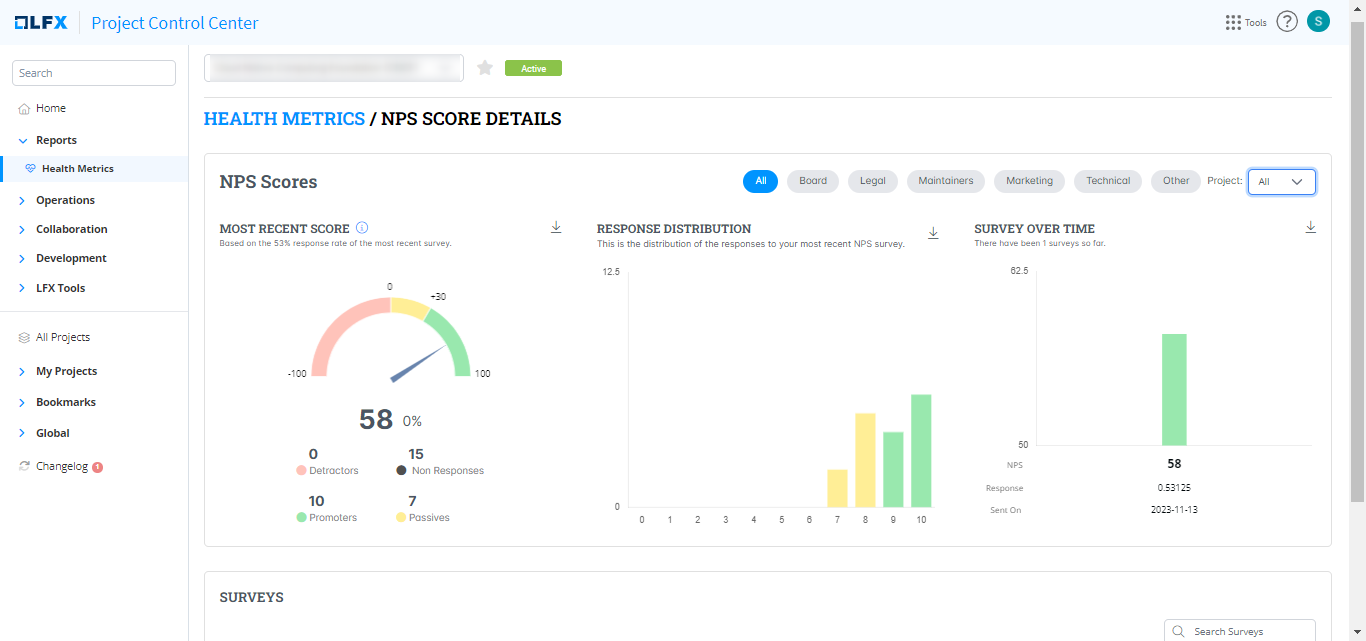
1. **NPS Score**: The main feature of the dashboard is the NPS score, which is prominently displayed in the center. In this case, the NPS is 58.
2. **Promoters, Passives, and Detractors**: These are the three categories of respondents:
* **Promoters (score 9-10)**: These are loyal enthusiasts who will keep buying and referring others, fueling growth. In this dashboard, there are 10 Promoters.
* **Passives (score 7-8)**: These are satisfied but unenthusiastic customers vulnerable to competitive offerings. There are 7 Passives.
* **Detractors (score 0-6)**: These unhappy customers can damage your brand through negative word-of-mouth. In this example, there are no Detractors.
3. **Non Responses**: This category includes those who did not respond to the survey. There are 15 non-responses in this case.
4. **Gauge Visualization**: The gauge provides a visual representation of the NPS score, with sections colored red (-100 to 0), yellow (0 to +30), and green (+30 to +100) to indicate poor, moderate, and excellent scores, respectively. The current score is indicated by a needle pointing at 58 in the green zone.
5. **Last Updated**: Indicates the last time the NPS data was updated. For this dashboard, the last update was in Q4 2023.
6. **Audience**: Specifies the segment of respondents, in this case, the "Board."
7. **NPS Change Indicator**: This shows the change in NPS since the last measurement. Here, the NPS has not changed, as indicated by the red arrow and "0%".
**Interpreting the NPS**
* **NPS < 0**: More detractors than promoters. Indicates a need for significant improvement.
* **NPS 0-30**: More promoters than detractors, but room for improvement.
* **NPS 30-70**: Indicates a solid relationship with your customers.
* **NPS > 70**: Outstanding customer loyalty and satisfaction.
### Explore More
Click **Explore more** button to get more details about the NPS scores.
---
# Agent Instructions
This documentation is published with GitBook. GitBook is the documentation platform designed so that both humans and AI agents can read, navigate, and reason over technical content effectively. Learn more at gitbook.com.
## Querying This Documentation
If you need additional information that is not directly available in this page, you can query the documentation by asking a question.
Perform an HTTP GET request on the following URL with the `ask` and `goal` query parameters:
```
GET https://docs.linuxfoundation.org/lfx/project-control-center/v2-latest-version/reports/health-metrics/net-promoter-score-nps.md?ask=&goal=
```
`ask` is the immediate question: it should be specific, self-contained, and written in natural language.
`goal` is what the user is ultimately trying to achieve, the reason they need the answer. Sharing it helps GitBook give you a better, more relevant answer. A goal is most helpful when it describes the outcome the user wants rather than restating the question. For example, with `ask=how do I create an API token`, a goal like `automate deployments from our CI pipeline` lets GitBook tailor the answer to that use case.
The response will contain a direct answer to the question and relevant excerpts and sources from the documentation.
Use this mechanism when the answer is not explicitly present in the current page, you need clarification or additional context, or you want to retrieve related documentation sections.
.png?alt=media)