> For the complete documentation index, see [llms.txt](https://docs.linuxfoundation.org/lfx/llms.txt). Markdown versions of documentation pages are available by appending `.md` to page URLs; this page is available as [Markdown](https://docs.linuxfoundation.org/lfx/organization-dashboard/project-contributions.md).
# Code Contributions
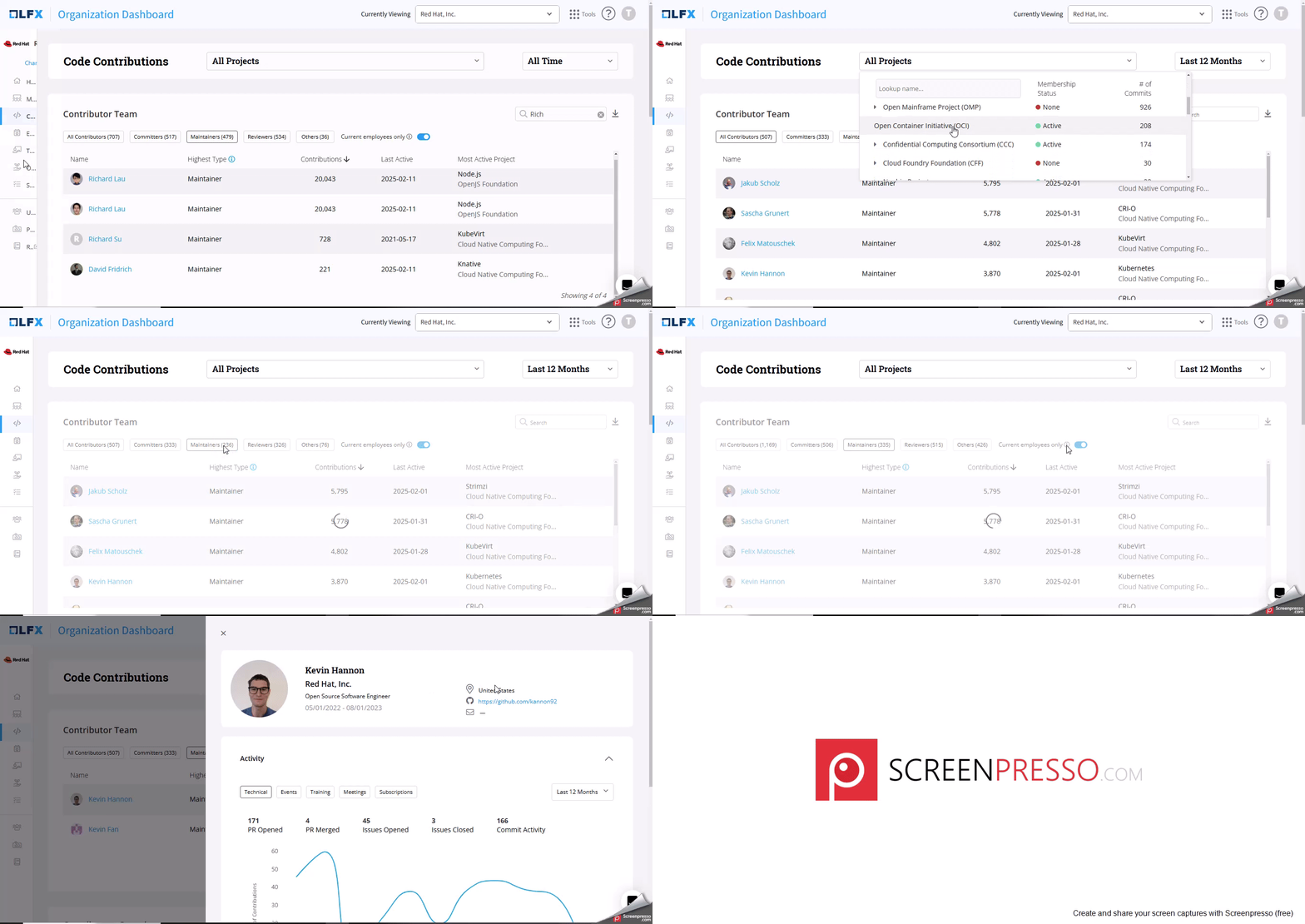
The **Code Contributions** feature in the **Organization Dashboard** provides analytics on the contributions your employees are making to various open-source projects.
**Accessing the Dashboard**
To access the **Code Contributions** feature:
1. Log in to the **Organization Dashboard**.
2. From the left sidebar, select **Code Contributions.**
**Dashboard Layout**
* **Search Box**: Located at the top of the dashboard, this allows you to search for specific projects.
* **Time Range Filters**: you can filter data based on the options from the drop down or select "All Time" to view cumulative data.
### **Leaderboard**
**Contributor Team**
* **Tabs**: Use the tabs at the top of the leaderboard to filter the view according to contributor roles: All Contributors, Committers, Maintainers, Reviewers and Others.
* **Toggle**: A toggle switch allows you to filter the data to show only current employees.
* **Columns**:
* **Name**: Displays the contributor's name. Clicking on a name will display a snapshot of the contributor's detailed profile.
* **Highest Type**: This column shows the contributor type with the highest level of responsibility. To know more, click icon.
* **Contributions:** This shows the total number of commits made by the contributor.
* **Last Active**: Indicates the last active date of the contributor in the project.
* **Most Active Project:** Indicates the name of the project where you contributed the most.
**Additional Metrics**
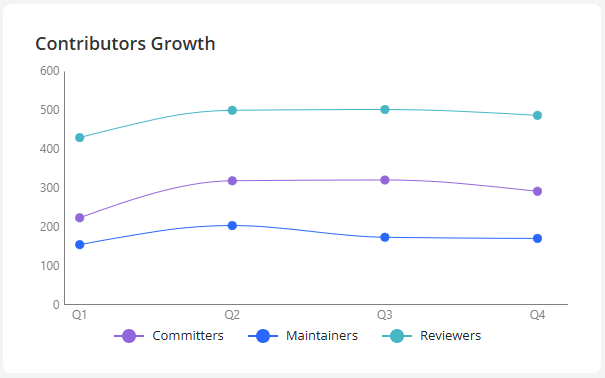
* **Contributors Growth Line Chart**: This chart displays the growth over time of **Committers**, **Maintainers**, and **Reviewers**, allowing you to visualize trends and patterns in contributions.
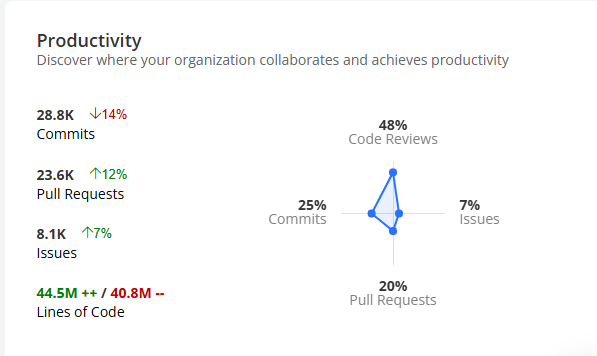
* **Productivity:** helps you understand and analyze where and how your organization collaborates and drives productivity within open-source projects.
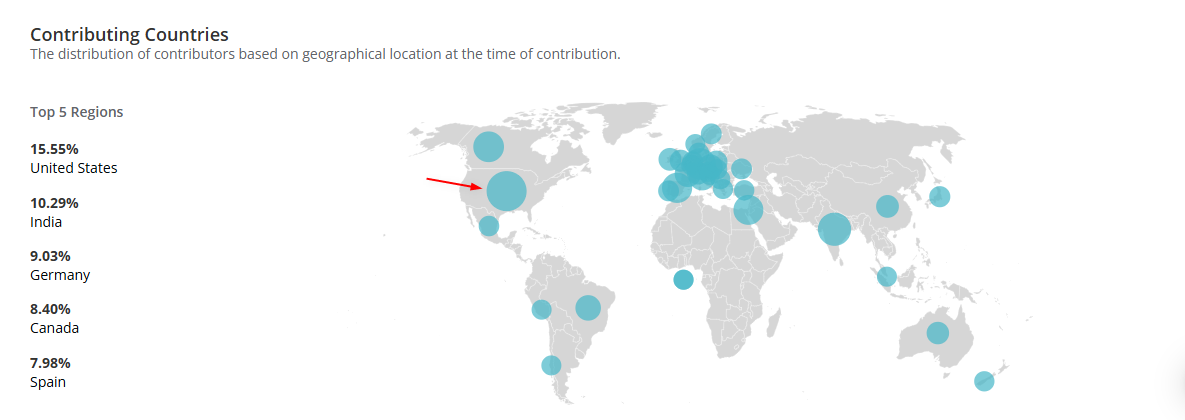
* **Contributing Countries**: A visual representation showing the geographic distribution of contributors. Hover over the blue circle to see the contributions from that geo-location.
***
## Technical Influence Score
The **Technical Influence Score** is a composite metric that measures your organization's technical contribution and influence within an open-source project. It aggregates five distinct metrics into a single score ranging from **Limited** to **Strong**.
### Score Levels
| Score | Level | Description |
| ----- | ----------- | ------------------------------------------------------------------------ |
| 0 | 🔴 Limited | Minimal technical influence — early engagement or pilot projects |
| 1 | 🟡 Emerging | Growing technical presence — building momentum |
| 2 | 🔵 Moderate | Solid technical contribution — established ongoing involvement |
| 3 | 🟢 Strong | Significant technical leadership — core contributor, strategic influence |
### Individual Metrics
Each of the five metrics contributes **0–3 points** toward the overall score (maximum 15 points total).
#### 1. Maintainers
Measures the count of maintainers employed by your company.
| Maintainer Count | Points | Level |
| ---------------- | ------ | ---------- |
| 0 | 0 | 🔴 Limited |
| 1 or more | 3 | 🟢 Strong |
Having even one maintainer represents significant influence over project direction and code approval. This is an "all or nothing" metric.
#### 2. Contributors
Measures the percentage of contributors employed by your company compared to all project contributors.
| Contributor % | Points | Level |
| ------------- | ------ | ----------- |
| 0.0% – 0.9% | 0 | 🔴 Limited |
| 1.0% – 4.9% | 1 | 🟡 Emerging |
| 5.0% – 19.9% | 2 | 🔵 Moderate |
| ≥ 20.0% | 3 | 🟢 Strong |
#### 3. Commit Activities
Measures the percentage of commits from your company's employees compared to total project commits.
| Commit % | Points | Level |
| ------------ | ------ | ----------- |
| 0.0% – 0.9% | 0 | 🔴 Limited |
| 1.0% – 4.9% | 1 | 🟡 Emerging |
| 5.0% – 19.9% | 2 | 🔵 Moderate |
| ≥ 20.0% | 3 | 🟢 Strong |
#### 4. Pull Requests Opened
Measures the percentage of PRs opened by your company's employees compared to all project PRs.
| PR % | Points | Level |
| ------------ | ------ | ----------- |
| 0.0% – 0.9% | 0 | 🔴 Limited |
| 1.0% – 4.9% | 1 | 🟡 Emerging |
| 5.0% – 19.9% | 2 | 🔵 Moderate |
| ≥ 20.0% | 3 | 🟢 Strong |
#### 5. Average Time to Merge PRs
Measures how your company's PR merge time compares to the project average. Faster merge times indicate high-quality contributions and strong relationships with maintainers.
| Speed Comparison | Points | Level |
| ------------------------------ | ------ | ----------- |
| > 10% slower than average | 0 | 🔴 Limited |
| 0.1% – 10% slower than average | 1 | 🟡 Emerging |
| 0% – 25% faster than average | 2 | 🔵 Moderate |
| > 25% faster than average | 3 | 🟢 Strong |
### Overall Score Calculation
Points from all five metrics are summed (maximum 15) and mapped to a final score:
| Total Points | Score | Level |
| ------------ | ----- | ----------- |
| 12 – 15 | 3 | 🟢 Strong |
| 8 – 11 | 2 | 🔵 Moderate |
| 4 – 7 | 1 | 🟡 Emerging |
| 0 – 3 | 0 | 🔴 Limited |
**Key design principles:**
* **Compensatory scoring**: Strong performance in some metrics can offset weakness in others.
* **Maintainer leverage**: A single maintainer adds 3 points — the largest single-metric impact available.
* **Consistent thresholds**: Contributors, Commits, and PRs all use the same 1% / 5% / 20% breakpoints.
* **Actionable tiers**: Each level has clear improvement targets.
### Real-World Examples
**Strong (15 points)**
2 maintainers (3pts) + 25% contributors (3pts) + 30% commits (3pts) + 22% PRs (3pts) + 40% faster merges (3pts) = **15 points → Strong**
**Moderate (8 points)**
0 maintainers (0pts) + 12% contributors (2pts) + 15% commits (2pts) + 18% PRs (2pts) + 15% faster merges (2pts) = **8 points → Moderate**
**Emerging (4 points)**
0 maintainers (0pts) + 3% contributors (1pt) + 2.5% commits (1pt) + 4% PRs (1pt) + 5% slower merges (1pt) = **4 points → Emerging**
**Path from Moderate to Strong:** Gain one maintainer (+3 points) and push any single percentage metric above the next threshold (+1 point) to reach 12 points.
### Frequently Asked Questions
**Why does having 1 maintainer give the maximum 3 points?**
Maintainers have significant control over project direction, code approval, and release management. Even a single maintainer represents substantial strategic influence.
**Can I reach Strong without a maintainer?**
Yes — but you need consistently high performance across all other metrics (each scoring 3 points, totaling 12). This reflects that volume and quality of contribution can substitute for formal maintainer status.
**Why is merge time scored with faster = better?**
Faster merge times indicate high-quality PRs that pass review quickly, strong relationships with maintainers, and deep understanding of project standards.
**What happens if data is missing for a metric?**
Missing or null metric values default to 0 points for that metric.
**How often are scores recalculated?**
Scores are recalculated whenever new metrics data is fetched, when you switch projects, or when you change the time range filter.
---
# Agent Instructions
This documentation is published with GitBook. GitBook is the documentation platform designed so that both humans and AI agents can read, navigate, and reason over technical content effectively. Learn more at gitbook.com.
## Querying This Documentation
If you need additional information that is not directly available in this page, you can query the documentation by asking a question.
Perform an HTTP GET request on the following URL with the `ask` and `goal` query parameters:
```
GET https://docs.linuxfoundation.org/lfx/organization-dashboard/project-contributions.md?ask=&goal=
```
`ask` is the immediate question: it should be specific, self-contained, and written in natural language.
`goal` is what the user is ultimately trying to achieve, the reason they need the answer. Sharing it helps GitBook give you a better, more relevant answer. A goal is most helpful when it describes the outcome the user wants rather than restating the question. For example, with `ask=how do I create an API token`, a goal like `automate deployments from our CI pipeline` lets GitBook tailor the answer to that use case.
The response will contain a direct answer to the question and relevant excerpts and sources from the documentation.
Use this mechanism when the answer is not explicitly present in the current page, you need clarification or additional context, or you want to retrieve related documentation sections.