> For the complete documentation index, see [llms.txt](https://docs.linuxfoundation.org/lfx/llms.txt). Markdown versions of documentation pages are available by appending `.md` to page URLs; this page is available as [Markdown](https://docs.linuxfoundation.org/lfx/project-control-center/v2-latest-version/collaborations/meetings/verify-meeting-participants.md).
# Verify Meeting Participants
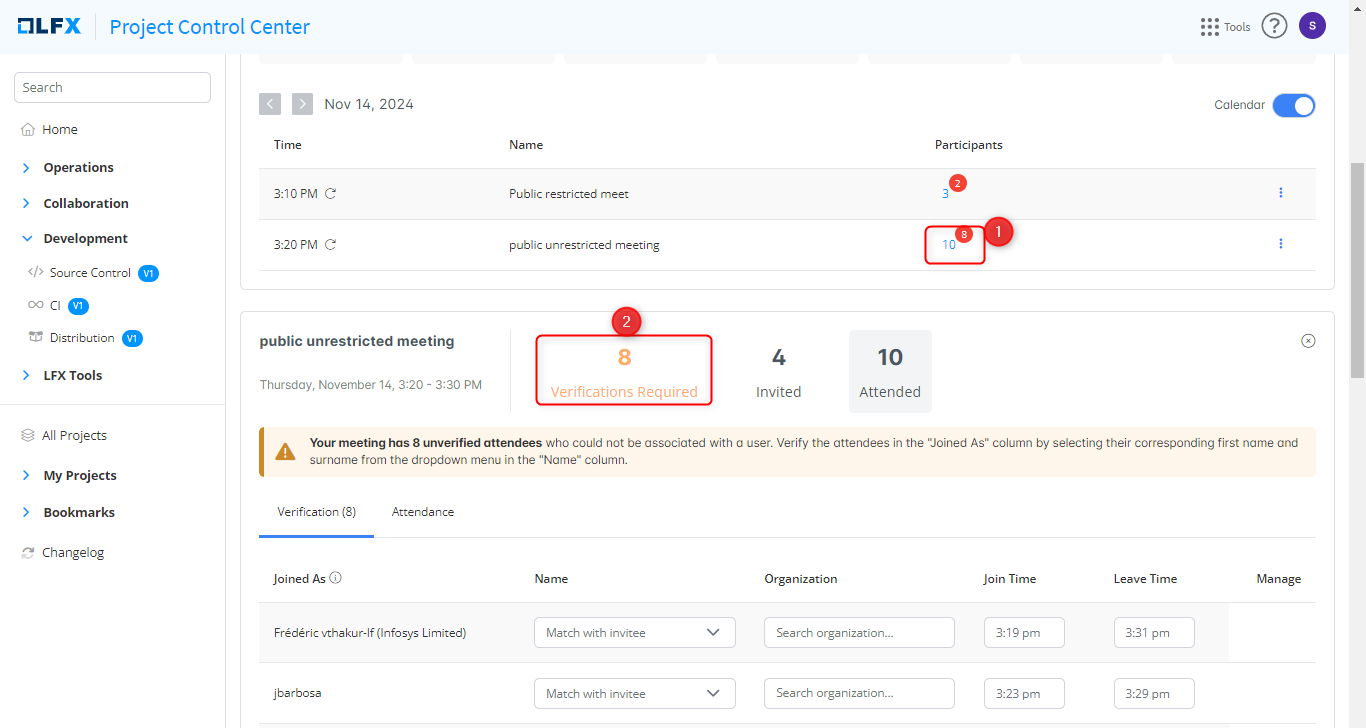
After a Zoom meeting ends, attendees who joined appear in the **Unverified Attendees** table. Verification links each Zoom display name to a known LFX user so attendance is accurately recorded against the project's invitee list.
## Manual Verification
Follow these steps to verify participants for a past meeting:
1. On the Home page, select the past date of the meeting. Alternatively, click **Collaboration > Meetings** and filter to past meetings.
2. Select the meeting you want to verify.
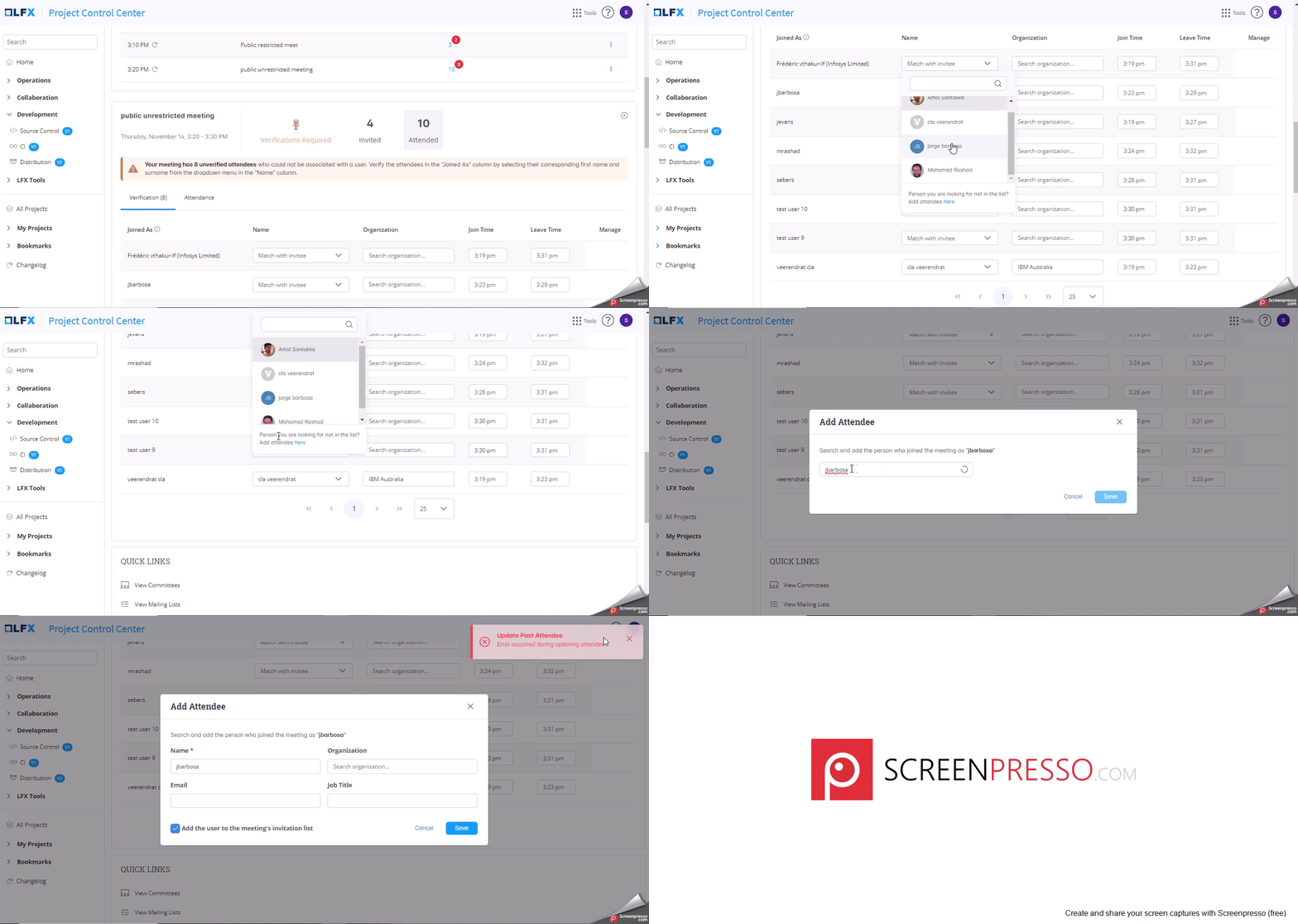
3. In the **Unverified Attendees** table, locate the attendee row. Open the invitee drop-down and select the matching LFX user.
4. If the attendee is not on the invitee list (for example, a guest), click **Add Attendee** to create a new entry manually.
5. When you match a Zoom display name to an LFX user, you are prompted to **Save this association**. Saving it means the same Zoom name will be matched automatically in future meetings, so you do not need to re-identify the same participant in recurring calls.
> **Tip:** Saving associations is especially useful for community members who join with a display name that differs from their LFX profile name.
## Auto-Reconcile (Beta)
For meetings with a large number of unverified attendees, use **Auto-Reconcile** to let the AI suggest matches in bulk instead of working through each row manually.
Auto-Reconcile produces three categories of results:
| Category | What happens |
| ---------------------------------------- | ------------------------------------------ |
| **Auto-matched** (high confidence) | Applied immediately — no action needed |
| **Needs review** (medium/low confidence) | Shown to you to accept or reject |
| **Unknown** | Automatically marked as "Unknown Attendee" |
See the [Auto-Reconcile User Guide](/lfx/project-control-center/v2-latest-version/collaborations/meetings/verify-meeting-participants/auto-reconcile-user-guide.md) for step-by-step instructions, tips, and FAQs.
> ⚠️ Auto-Reconcile actions are **permanent** once applied. Review suggestions carefully before accepting.
---
# Agent Instructions
This documentation is published with GitBook. GitBook is the documentation platform designed so that both humans and AI agents can read, navigate, and reason over technical content effectively. Learn more at gitbook.com.
## Querying This Documentation
If you need additional information that is not directly available in this page, you can query the documentation by asking a question.
Perform an HTTP GET request on the following URL with the `ask` and `goal` query parameters:
```
GET https://docs.linuxfoundation.org/lfx/project-control-center/v2-latest-version/collaborations/meetings/verify-meeting-participants.md?ask=&goal=
```
`ask` is the immediate question: it should be specific, self-contained, and written in natural language.
`goal` is what the user is ultimately trying to achieve, the reason they need the answer. Sharing it helps GitBook give you a better, more relevant answer. A goal is most helpful when it describes the outcome the user wants rather than restating the question. For example, with `ask=how do I create an API token`, a goal like `automate deployments from our CI pipeline` lets GitBook tailor the answer to that use case.
The response will contain a direct answer to the question and relevant excerpts and sources from the documentation.
Use this mechanism when the answer is not explicitly present in the current page, you need clarification or additional context, or you want to retrieve related documentation sections.
.png?alt=media)