> For the complete documentation index, see [llms.txt](https://docs.linuxfoundation.org/lfx/llms.txt). Markdown versions of documentation pages are available by appending `.md` to page URLs; this page is available as [Markdown](https://docs.linuxfoundation.org/lfx/organization-dashboard/organization-dashboard-beta-version/events.md).
# Events
**The Linux Foundation** organizes various open-source events throughout the year, benefiting various open-source projects. These events play a crucial role in building and sustaining open-source communities.
## Why attend these open-source events?
* **Exchange Ideas**: Participants can share their knowledge and exchange ideas with the community.
* **Learn from Peers**: Attendees can learn from other open-source enthusiasts and experts.
* **Collaborate**: These events foster collaboration among developers, designers, and contributors.
* **Innovate**: Participants can design and develop new open-source solutions.
* **Security Challenges**: Hackathons address security challenges and troubleshoot issues.
* **Linux Foundation Events**: You can explore all the events organized and hosted by the Linux Foundation.
* **Organizations’ Role**:
* **Registration**: Organizations can register and participate in various events.
* **Support**: By sponsoring events, organizations contribute to bringing the open-source community together to tackle challenges collectively.
You can check out all the events organized and hosted by the Linux Foundation at [Linux Foundation Events](https://events.linuxfoundation.org).
## Events in Overview
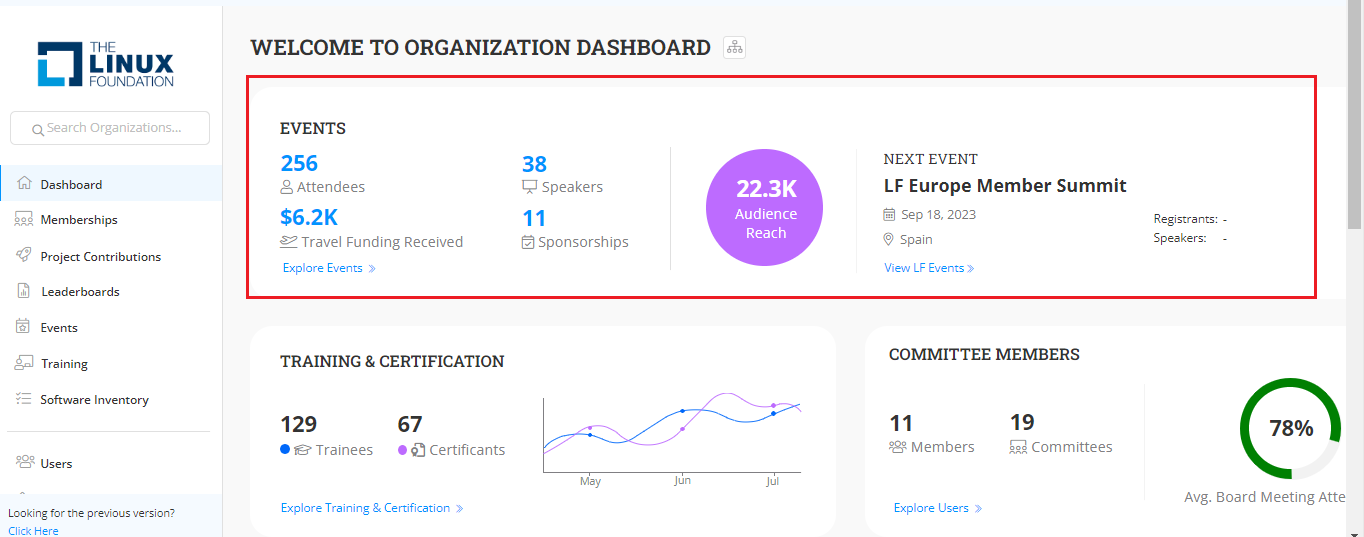
The **Organization Dashboard** assists you in managing events related to your organization. The events tab provides all information related to open source events and contributions of your organization in developing the open source project.
The events tab provides you the information on the following:
* Attendees - Total number of employees attended from your organization for open source events.
* Speakers - Total number of speakers from your organization for the open source events.
* Travel Funding Reserved - Travel Funding received from the Linux Foundation for various open source events. This fund will help the open source developers and community members to participate in open source events which would had been difficult without getting travel funds from the Linux Foundation.
* Sponsorship - Total number of events sponsored by your organization for the open source events.
* Audience Reach: Audience reach for the open source event.
* Next upcoming events provide you with the engagement on 3 upcoming events.
* Event date - The date when the event is going to happen.
* Event venue details - location where the event is going to happen.
* Number of registrants - Number of participants from your organization planning to attend the event.
* Number of sponsorship - Sponsorship that they have submitted and sponsoring
* Number of speakers from your organization
* Audience reach
Events
{% hint style="info" %}
* On click of **Explore Events** link, the Events Insights page appears that provides you with details related to attendees, speakers, sponsorship and travel funding. For more information, refer [Events](https://docs.linuxfoundation.org/lfx/organization-dashboard/events-insights).
* On click of **View LF Events** link, the upcoming LF events webpage appears. For more information refer to Upcoming [LF Events](https://events.linuxfoundation.org/).
{% endhint %}
{% hint style="warning" %}
The data that is populated in this dashboard is from the year 2023. If the data is not available and if they are yet to make any contributions, they need to start participating in upcoming events.
{% endhint %}
Events
---
# Agent Instructions
This documentation is published with GitBook. GitBook is the documentation platform designed so that both humans and AI agents can read, navigate, and reason over technical content effectively. Learn more at gitbook.com.
## Querying This Documentation
If you need additional information that is not directly available in this page, you can query the documentation by asking a question.
Perform an HTTP GET request on the following URL with the `ask` and `goal` query parameters:
```
GET https://docs.linuxfoundation.org/lfx/organization-dashboard/organization-dashboard-beta-version/events.md?ask=&goal=
```
`ask` is the immediate question: it should be specific, self-contained, and written in natural language.
`goal` is what the user is ultimately trying to achieve, the reason they need the answer. Sharing it helps GitBook give you a better, more relevant answer. A goal is most helpful when it describes the outcome the user wants rather than restating the question. For example, with `ask=how do I create an API token`, a goal like `automate deployments from our CI pipeline` lets GitBook tailor the answer to that use case.
The response will contain a direct answer to the question and relevant excerpts and sources from the documentation.
Use this mechanism when the answer is not explicitly present in the current page, you need clarification or additional context, or you want to retrieve related documentation sections.