> For the complete documentation index, see [llms.txt](https://docs.linuxfoundation.org/lfx/llms.txt). Markdown versions of documentation pages are available by appending `.md` to page URLs; this page is available as [Markdown](https://docs.linuxfoundation.org/lfx/project-control-center/v2-latest-version/collaborations/voting-feature/abstain-voting.md).
# Abstain Voting
The Abstain Voting feature allows committee members to formally record their decision not to vote on a poll, as opposed to not responding at all. This provides transparency in distinguishing between members who actively chose not to participate and those who did not respond.
## Overview
When the "Allow Abstain Option" is enabled for a poll, eligible voters can choose to abstain from the entire vote. Abstaining is different from not voting—it represents an active decision to opt out while still being counted as a participant.
### Key Features
* **Poll-Level Abstention**: Voters abstain from the entire poll, not individual questions
* **Transparency**: Abstained votes are counted and displayed separately from votes cast
* **Voter Privacy**: When pseudo-anonymity is disabled, poll administrators can view who abstained
* **Participation Tracking**: Abstentions contribute to overall participation metrics
***
## Understanding Abstain vs. No Response
It's important to understand the distinction between abstaining and not responding:
| Aspect | Abstain Vote | No Response |
| ----------------- | ------------------------------------------------- | --------------------------------------- |
| **Action** | Active decision to opt out | No action taken |
| **Participation** | Counted as participated | Not counted as participated |
| **Visibility** | Tracked and displayed in results | Shown as pending or no response |
| **Intent** | Clear signal of choosing not to vote | Unclear (may have missed notification) |
| **Best For** | When you want to be recorded as declining to vote | When you genuinely did not see the poll |
***
## Enabling Abstain Voting
Poll administrators can enable the abstain option when creating or editing a poll.
### During Poll Creation
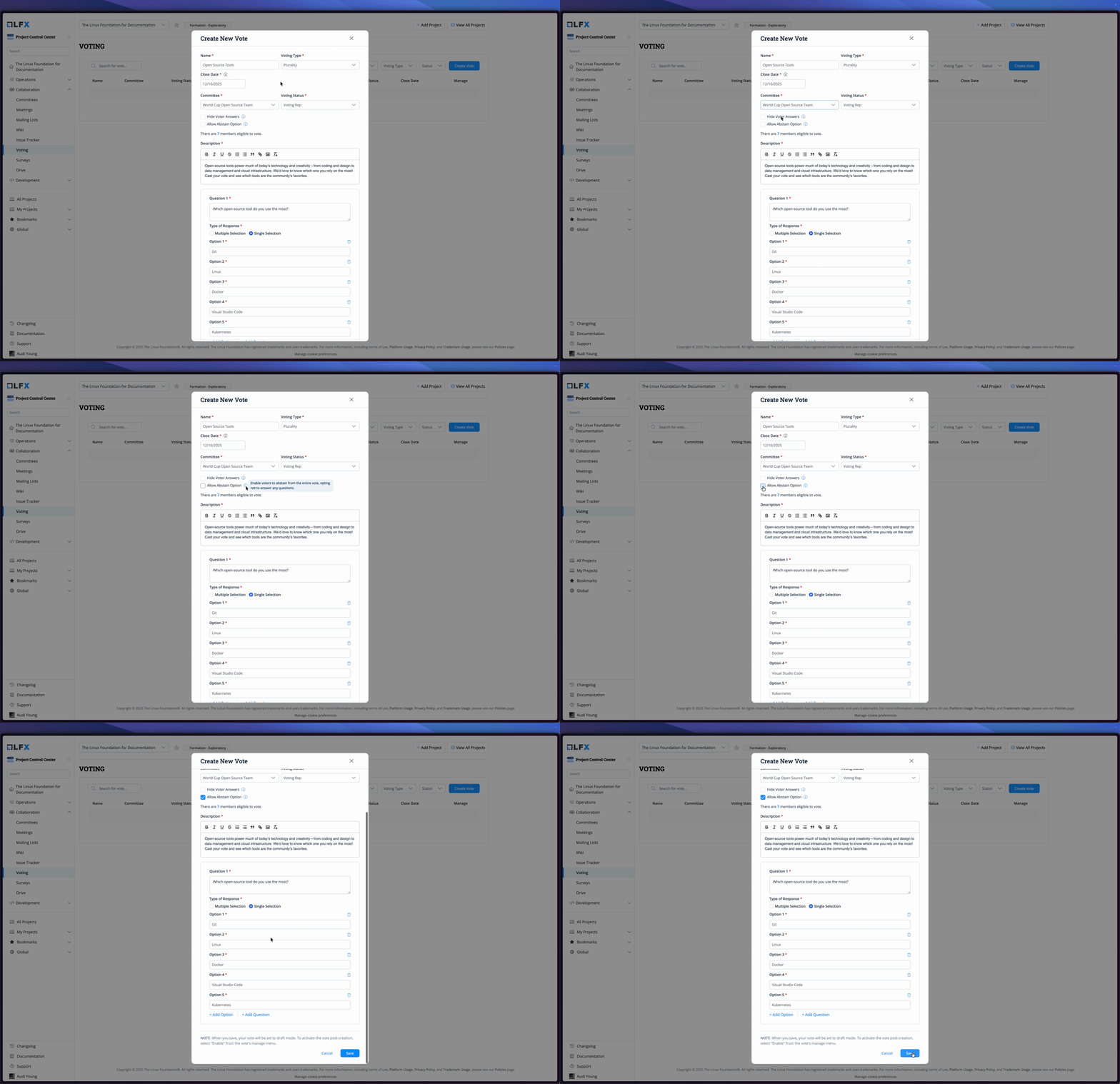
Enabling abstain voting during poll creation
1. Navigate to **Collaboration > Voting** in the PCC.
2. Click **Create Vote**.
3. In the **Create New Poll** form, locate the **Allow Abstain Option** checkbox.
4. Check the box to enable abstain voting.
5. Complete the rest of the poll details and click **Save**.
{% hint style="info" %}
The **Allow Abstain Option** is available for the following voting types:
* Plurality (Hybrid)
* Condorcet IRV
* Instant-Runoff Voting
* Meek STV
{% endhint %}
### Poll Form Settings
The abstain option appears as a checkbox in the poll creation form with the following details:
* **Label**: "Allow Abstain Option"
* **Tooltip**: "Enable voters to abstain from the entire vote, opting not to answer any questions."
* **Default**: Unchecked (disabled)
***
## How Voters Abstain
Once a poll with abstain voting enabled is active, eligible committee members can choose to abstain.
### Abstaining from a Poll
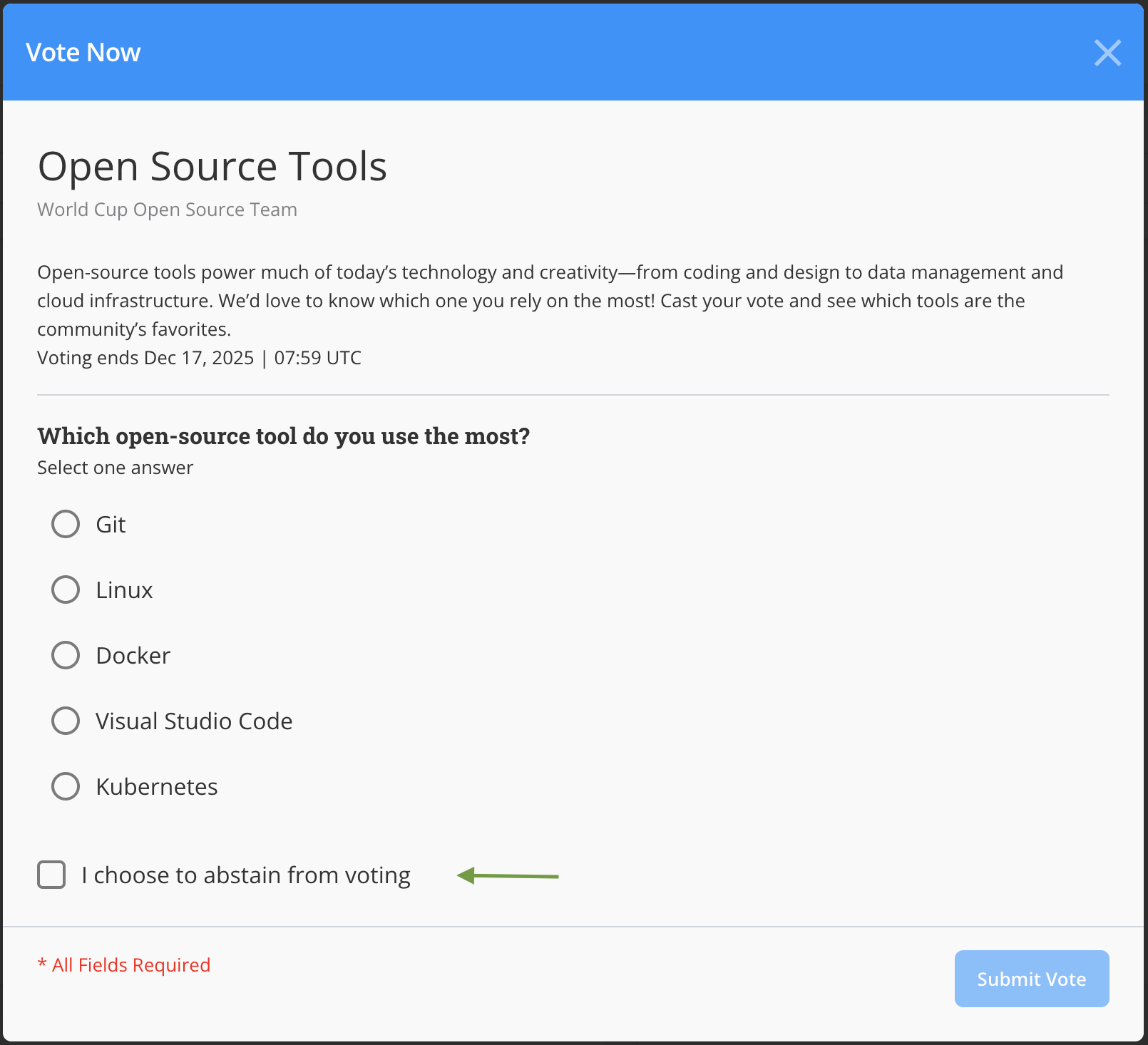
Abstain voting checkbox in the voting interface
1. Access your **LFX Individual Dashboard** or click **Vote Now** in the email notification.
2. In the **Individual Dashboard**, locate the voting notification under **Activities**.
3. Click on the poll name to view the poll details.
4. Instead of selecting choices, check the **I choose to abstain from voting** checkbox.
5. Confirm your decision to abstain from the vote.
{% hint style="warning" %}
Abstaining is final. Once you submit an abstain vote, you cannot change it to a regular vote (and vice versa) unless the poll administrator extends the deadline and allows revotes.
{% endhint %}
***
## Viewing Abstain Results
Poll administrators can view abstain voting results in the poll results page.
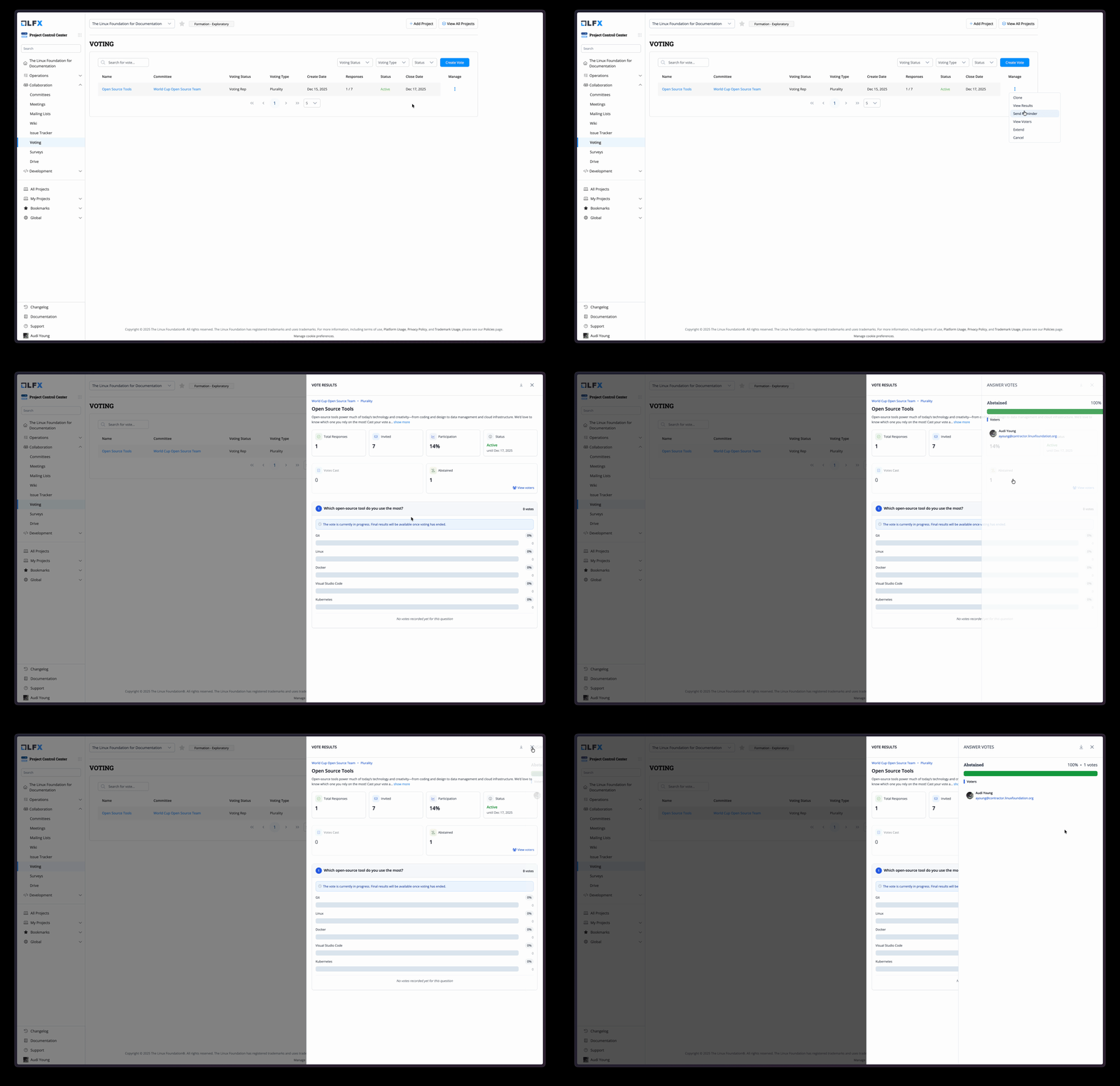
Viewing abstained results in the poll results page
### Results Display
When viewing poll results for a poll with abstain voting enabled, you'll see:
#### Summary Metrics
At the top of the results page, two key metrics are displayed:
1. **Votes Cast**: Number of committee members who submitted actual votes (excluding abstentions)
* Click to view list of voters (when pseudo-anonymity is disabled)
2. **Abstained**: Number of committee members who chose to abstain
* Click to view list of abstained voters (when pseudo-anonymity is disabled)
{% hint style="info" %}
The **Abstained** metric only appears when the "Allow Abstain Option" was enabled for the poll.
{% endhint %}
#### Voter Details
When pseudo-anonymity is **disabled**, administrators can:
* Click on the **Votes Cast** card to see which members voted
* Click on the **Abstained** card to see which members abstained
* View voter information including:
* Member name
* Organization
* Role
* Voting status
* Timestamp of submission
#### With Pseudo-Anonymity
When pseudo-anonymity is **enabled**:
* Vote counts are still displayed
* Individual voter identities are hidden in the PCC interface
* "View voters" links are disabled
* Vote data remains linked to users via API for auditing purposes
***
## Use Cases for Abstain Voting
### When to Enable Abstain Option
Consider enabling the abstain option when:
* **Conflict of Interest**: Members may need to abstain due to conflicts
* **Formal Governance**: Organization bylaws require tracking abstentions
* **Quorum Requirements**: Need to distinguish participation from agreement
* **Transparency**: Want clear records of who declined to vote
### When Voters Should Abstain
Committee members should consider abstaining when:
* They have a conflict of interest on the topic
* They lack sufficient information to make an informed decision
* They want to be present but neutral on the matter
* Organization rules require abstention in certain situations
***
## Best Practices
### For Poll Administrators
1. **Clear Communication**: In the poll description, explain when abstaining is appropriate
2. **Consider Pseudo-Anonymity**: Decide if abstention visibility is necessary for your use case
3. **Set Expectations**: Clarify whether abstentions affect quorum or decision thresholds
4. **Review Participation**: Use abstain data to understand overall engagement
### For Voters
1. **Abstain vs. Ignore**: Choose abstain if you want to formally decline; otherwise, simply not responding is acceptable
2. **Timely Decision**: Abstain before the deadline if you've decided not to vote
3. **Understand Impact**: Know how your abstention affects the poll outcome per your organization's rules
***
## Frequently Asked Questions
**Q: Does abstaining count toward quorum?**\
A: This depends on your organization's governance rules. Abstentions are counted as participation but not as votes cast. Check with your organization's policies.
**Q: Can I change my abstention to a vote?**\
A: Generally no, once submitted. However, if the poll administrator extends the deadline and enables revoting, you may be able to change your response.
**Q: Can I abstain from individual questions?**\
A: No, abstention applies to the entire poll. You cannot abstain from some questions and vote on others.
**Q: Will others see that I abstained?**\
A: Only if pseudo-anonymity is disabled for the poll. Poll administrators with proper permissions can then see who abstained.
**Q: How are abstentions displayed in results?**\
A: Abstentions are shown separately from votes cast, with their own count and optional voter list. They are not included in choice percentages or vote tallies.
**Q: Can I send reminders to members who abstained?**\
A: The "Send Reminder" feature targets members who have not voted. Members who have already abstained are considered to have participated and will not receive reminders.
---
# Agent Instructions
This documentation is published with GitBook. GitBook is the documentation platform designed so that both humans and AI agents can read, navigate, and reason over technical content effectively. Learn more at gitbook.com.
## Querying This Documentation
If you need additional information that is not directly available in this page, you can query the documentation by asking a question.
Perform an HTTP GET request on the following URL with the `ask` and `goal` query parameters:
```
GET https://docs.linuxfoundation.org/lfx/project-control-center/v2-latest-version/collaborations/voting-feature/abstain-voting.md?ask=&goal=
```
`ask` is the immediate question: it should be specific, self-contained, and written in natural language.
`goal` is what the user is ultimately trying to achieve, the reason they need the answer. Sharing it helps GitBook give you a better, more relevant answer. A goal is most helpful when it describes the outcome the user wants rather than restating the question. For example, with `ask=how do I create an API token`, a goal like `automate deployments from our CI pipeline` lets GitBook tailor the answer to that use case.
The response will contain a direct answer to the question and relevant excerpts and sources from the documentation.
Use this mechanism when the answer is not explicitly present in the current page, you need clarification or additional context, or you want to retrieve related documentation sections.