> For the complete documentation index, see [llms.txt](https://docs.linuxfoundation.org/lfx/llms.txt). Markdown versions of documentation pages are available by appending `.md` to page URLs; this page is available as [Markdown](https://docs.linuxfoundation.org/lfx/easycla/v2-current/automated-sanctions-screening.md).

# Automated Sanctions Screening

In addition to the [compliance confirmation checkbox](/lfx/easycla/v2-current/embargo-compliance-for-secure-cla-signing.md) that must be checked before signing a CLA, EasyCLA automatically screens organizations against government sanctions and trade-compliance lists, such as the lists published by the U.S. Department of the Treasury's [Office of Foreign Assets Control (OFAC)](https://ofac.treasury.gov/sanctions-programs-and-country-information).

The screening is performed by the **LFX Sanctions Screening Service (SSS)**, a shared LFX platform service that checks organizations against sanctions and watch lists through a specialized trade-compliance provider. Every screened organization receives one of two statuses:

* **Clean** — no sanctions match was found. All EasyCLA workflows proceed normally.
* **Flagged** — the organization potentially matches an entry on a sanctions or watch list. Corporate CLA (CCLA) signing and employee acknowledgements (ECLA) are blocked until the organization is reviewed and cleared.

<details>

<summary>Understanding the concept</summary>

Embargo compliance refers to the process of adhering to regulations and restrictions imposed by governments, organizations, or industries that prohibit or limit the sale, export, or transfer of certain goods, services, or technologies. Embargoes are often implemented to:

1. **Embargo Countries**: Nations with whom trade is entirely or heavily restricted due to political, economic, or security reasons.
2. **Sanctioned Countries**: Nations or entities under specific restrictions, such as trade, financial dealings, or travel, imposed by governments or organizations like the UN.
3. **OFAC**: The U.S. Treasury's Office of Foreign Assets Control, which enforces sanctions programs targeting countries, entities, and individuals.

</details>

## What is screened, and when

EasyCLA screens the **organization** that a corporate CLA workflow is being performed for — its name, its website domain, and (when available) its Linux Foundation organization record.

{% hint style="info" %}
Sanctions screening applies to organizations only. Individuals are not screened, so signing an **Individual CLA (ICLA)** on your own behalf is not affected.
{% endhint %}

A fresh screening runs automatically — there is no extra step for you to perform — at the key points in the EasyCLA workflows:

* When a corporate contributor selects their organization in the EasyCLA Contributor Console and proceeds to [complete the company acknowledgement (ECLA)](/lfx/easycla/v2-current/contributors/corporate-contributor.md#acknowledge-company-contribution).
* When the CCLA document is prepared for signature — both when a CLA Manager [signs the CCLA directly](/lfx/easycla/v2-current/corporate-cla-managers/coordinate-signing-cla-and-become-initial-cla-manager.md) and when a CLA Signatory [reviews and signs the CCLA by an email request](/lfx/easycla/v2-current/ccla-signatories/review-and-sign-a-corporate-cla-by-request.md) — and once more when the signed CCLA is finalized.

The most recent screening result is also enforced at other points in the workflows — for example, when the [Auto Enable Acknowledgement (Auto ECLA) workflow](/lfx/easycla/v2-current/contributors/corporate-contributor.md#auto-enable-acknowledgement-for-corporate-contributors) is enabled, when EasyCLA automatically creates employee acknowledgements for contributors who are added to the approved list, and when the EasyCLA checks on pull requests and merge requests verify contributor authorization.

A screening result is reused for a few minutes, so repeating an action in a short period of time does not trigger another screening.

## What happens when an organization is flagged

### Corporate contributors (ECLA)

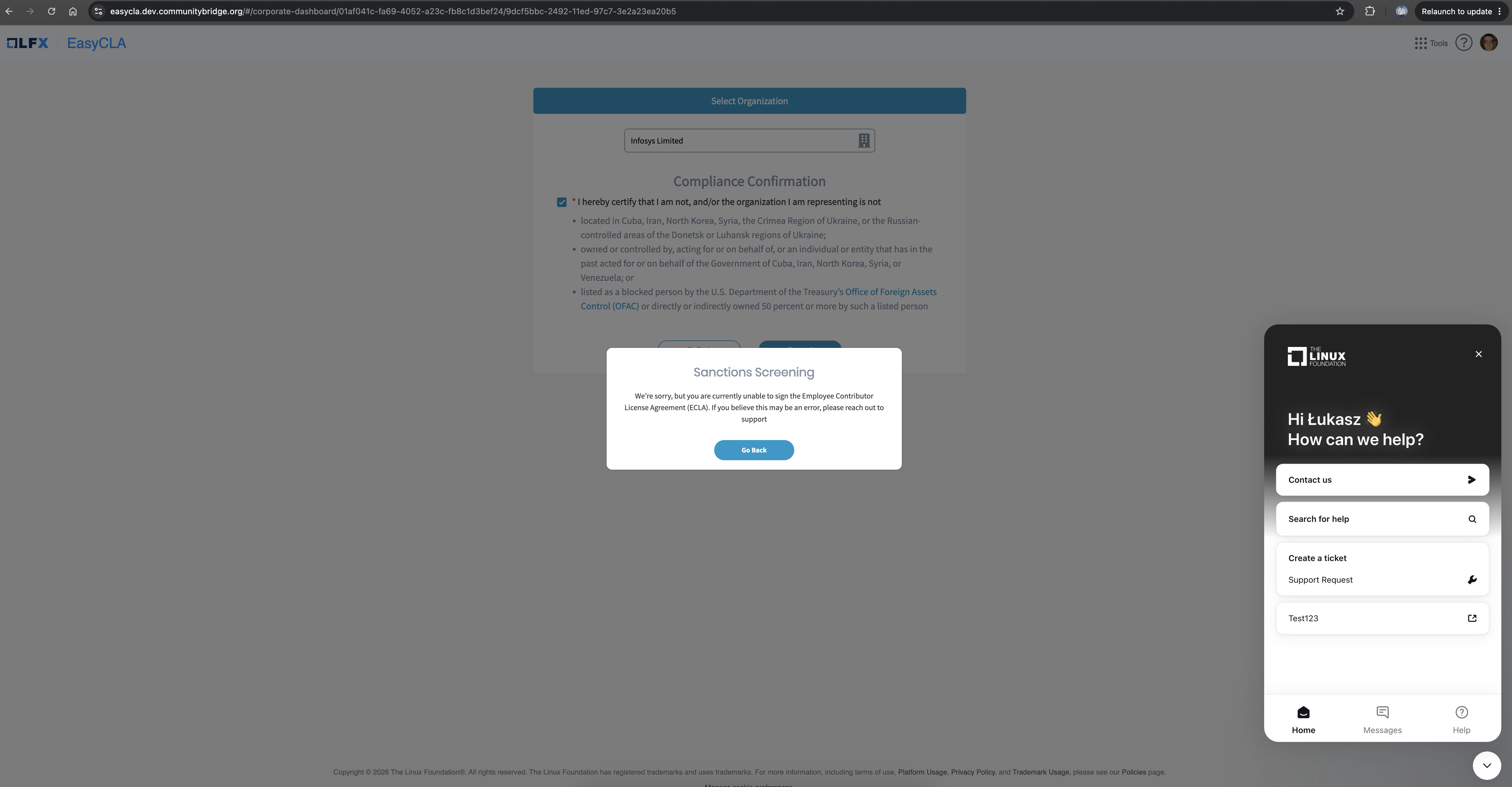
If the organization you select in the EasyCLA Contributor Console is flagged, a **Sanctions Screening** dialog appears and the employee acknowledgement (ECLA) cannot be completed:

<figure><img src="/files/ElWAgj4ZQRAbT7Y1PeD7" alt="Sanctions Screening dialog in the EasyCLA Contributor Console"><figcaption><p>The EasyCLA Contributor Console blocks the ECLA acknowledgement because the selected organization is flagged by sanctions screening</p></figcaption></figure>

Because the acknowledgement cannot be completed, the EasyCLA check on your pull request, merge request, or Gerrit change continues to fail until your organization is cleared.

{% hint style="info" %}
If your organization was flagged during an earlier screening, the Contributor Console can show an advisory warning immediately after you select the organization. You can still proceed to the next step — EasyCLA re-verifies the status with a fresh screening, and blocks the acknowledgement only if the organization is still flagged.
{% endhint %}

### CLA Managers and CLA Signatories (CCLA)

If the organization is flagged when the CCLA is being prepared for signature, the **Preparing CCLA** dialog changes to **Unable to Prepare CCLA** with a message that the CCLA cannot be completed at this time, and the **Sign CCLA** button remains disabled. Similarly, a CLA Manager who tries to send a signature request email to an authorized signatory for a flagged organization sees an **Unable to Sign** message, and the request is not sent.

## If you believe your organization is flagged in error

Sanctions screening compares organization details against external watch lists, so a flag can result from a name similarity that does not apply to your organization. If you believe your organization is flagged in error, contact EasyCLA support via the chat widget in the console, or file a support ticket. The compliance team will review the screening result, and the flag is removed if the review confirms there is no match.

## After an organization is cleared

No manual steps are needed in EasyCLA after an organization is cleared. The next time you retry the blocked action, EasyCLA re-screens the organization, picks up the **clean** status, and the workflow proceeds normally. Because screening results are reused for a few minutes, allow up to five minutes after the clearance before retrying.

{% hint style="warning" %}
In some cases, The Linux Foundation staff can place a manual compliance block on an organization. A manual block is not lifted automatically by a clean screening result — contact EasyCLA support if you believe a manual block should be removed.
{% endhint %}


---

# Agent Instructions
This documentation is published with GitBook. GitBook is the documentation platform designed so that both humans and AI agents can read, navigate, and reason over technical content effectively. Learn more at gitbook.com.

## Querying This Documentation
If you need additional information that is not directly available in this page, you can query the documentation dynamically by asking a question.

Perform an HTTP GET request on the current page URL with the `ask` query parameter:

```
GET https://docs.linuxfoundation.org/lfx/easycla/v2-current/automated-sanctions-screening.md?ask=<question>
```

The question should be specific, self-contained, and written in natural language.
The response will contain a direct answer to the question and relevant excerpts and sources from the documentation.

Use this mechanism when the answer is not explicitly present in the current page, you need clarification or additional context, or you want to retrieve related documentation sections.
